Open and edit PSD files without Photoshop
Got a PSD from a designer, a template from the web or your own old projects? PixelForge opens Photoshop documents on Windows with their structure intact — layers stay layers, text stays editable — and saves them back to PSD so you can hand them on.
What stays editable in your PSD
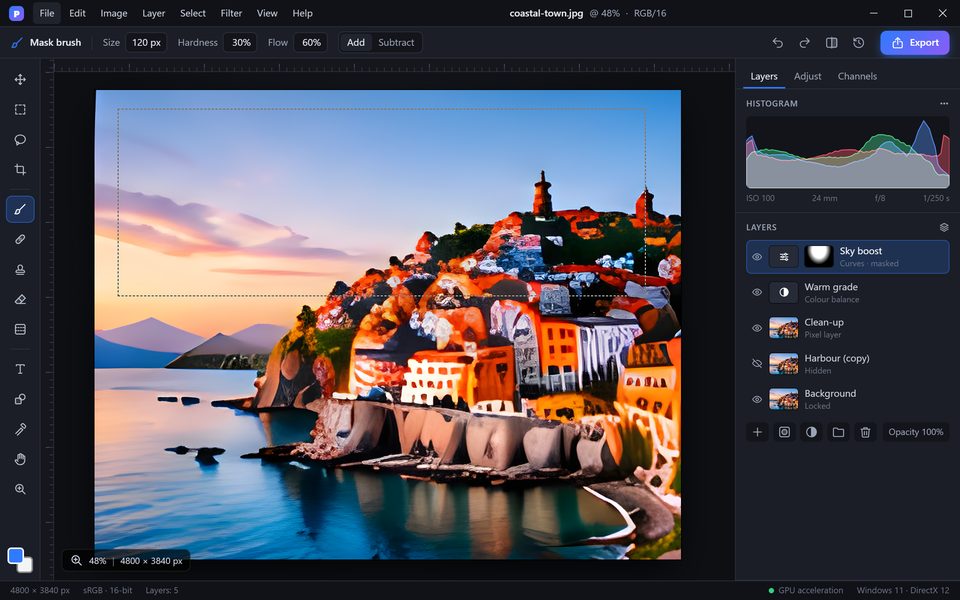
PixelForge reads the document structure, not just a flat picture.
Layers and groups
Layer order, names, groups, opacity, fill and blend modes are kept.
Masks
Layer masks, vector masks and clipping masks stay editable.
Adjustment layers
Curves, Levels, Hue/Saturation, Colour Balance and more remain live.
Text layers
Text stays editable; missing fonts can be replaced in one dialog.
Smart objects
Embedded smart objects and smart filters open and can be edited.
Layer styles
Drop shadow, stroke, glow, bevel and overlays are rendered and editable.
PSB and large files
Big PSB documents, 16/32-bit images and ICC colour profiles are supported.
Save back to PSD
Save as PSD to share with others, or export JPG, PNG, WebP, AVIF and PDF.
How to open a PSD file on Windows
- Drag the .psd file onto the PixelForge window or use File > Open (Ctrl+O).
- Edit layers, text and masks as usual — the Layers panel shows the original structure.
- Press Ctrl+S to save back to PSD, or File > Export As for JPG, PNG or WebP.
Working with Photoshop shortcuts? See the shortcut cheat sheet.
PSD files in PixelForge — questions
Will my layers stay editable?
Yes. Layers, groups, masks, adjustment layers and text layers open as separate, editable layers.
Can I save my changes back to PSD?
Yes. Save with Ctrl+S or File > Save As > PSD. The file opens in other PSD-compatible editors as well.
Does PixelForge open PSB files?
Yes. Large documents in the PSB format open and save the same way as PSD files.
What happens if a font is missing?
PixelForge lists the missing fonts and lets you pick a replacement. The text layer stays editable.
Can I set PixelForge as the default app for PSD files?
Yes. During installation you can associate .psd and .psb files with PixelForge, or change it later in Windows Settings > Default apps.
Get PixelForge for Windows
Release November 20, 2026 · Windows 10 & 11 · 64-bit